Mecpow M1 Review
A compact 5W Class 1 laser engraver with a 100 x 100mm work area, up to 10,000mm/min engraving speed and Wi-Fi, USB and TF-card connectivity.
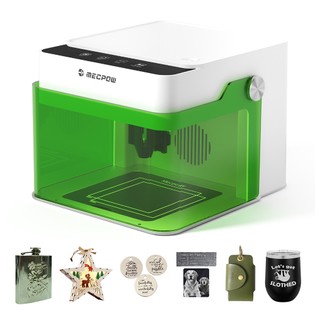
Advantages
- ✓ Compact enclosed form factor
- ✓ Multiple connectivity options
- ✓ Supports popular laser software
- ✓ Useful for a range of craft materials
Limitations
- – Small 100 x 100mm work area
- – 5W power limits cutting ability
- – Optional accessories cost extra
Overview
A compact 5W Class 1 laser engraver with a 100 x 100mm work area, up to 10,000mm/min engraving speed and Wi-Fi, USB and TF-card connectivity.
Key features
- 5W laser module
- 100 x 100mm engraving area
- Up to 10,000mm/min
- Wi-Fi, USB and TF card
- LightBurn and LaserGRBL support
- Compact enclosed design
How it works
Create or import a compatible design in supported software, position the material inside the work area, configure suitable laser settings for that material and run the engraving job.
Who it's for
Best for hobbyists, makers and small craft projects such as personalized wood, leather, coated metal, cardboard, stone or ceramic items.
What to consider before buying
Laser equipment requires careful material selection, ventilation and adherence to the manufacturer safety instructions. The 100 x 100mm work area is small and 5W power is not intended for heavy cutting.
Pricing and terms
Price and bundle options can change; check the current GeekBuying listing before purchase.
Check current GeekBuying return, warranty and regional safety information before ordering.
VelinQo verdict
The Mecpow M1 is best viewed as a compact maker tool for small engraving projects rather than a large production machine. Its enclosed Class 1 design and multiple connection methods are useful advantages, while the 100 x 100mm work area and 5W optical power set clear limits on project size and cutting capability.
Frequently asked questions
What is the engraving area?
100 x 100mm.
Which software is supported?
The listing names MKSLaser, LaserGRBL and LightBurn.
What devices are supported?
GeekBuying lists Windows, macOS, Android and iOS support.
Always verify current features, pricing and compatibility on the provider's website.